
Domain and DNS
Buy a domain, put its DNS on Cloudflare, attach it to the Worker or the Vercel project, and add the records email needs.
Outcome: https://<your-domain>/api/health answers 200, and pnpm tsx scripts/check-email.ts prints ✓ domain … verified.
Everything on this page is a You: step. DNS records live at your DNS provider, and no API key the agent holds can change them. The agent tells you exactly which records to add and checks them afterwards.
1. Buy a domain
Any registrar works. Common choices: Cloudflare Registrar, Porkbun, Namecheap, NameSilo. Compare prices on tld-list.com before you buy, and check the renewal price, not only the first year.
Use one domain for the site and for email. The sender address (DEFAULT_ADMIN_EMAIL, for example hello@yourdomain.com) must be on a domain you control. Gmail and Outlook addresses cannot be verified for sending.
2. Put the DNS on Cloudflare
For Cloudflare Workers this is required: a Worker custom domain needs the domain's DNS in the same Cloudflare account. For Vercel it is optional; you can add Vercel's records at any DNS provider.
-
Cloudflare dashboard → Add a domain → enter the domain → choose the Free plan (check the dashboard, menus move).
-
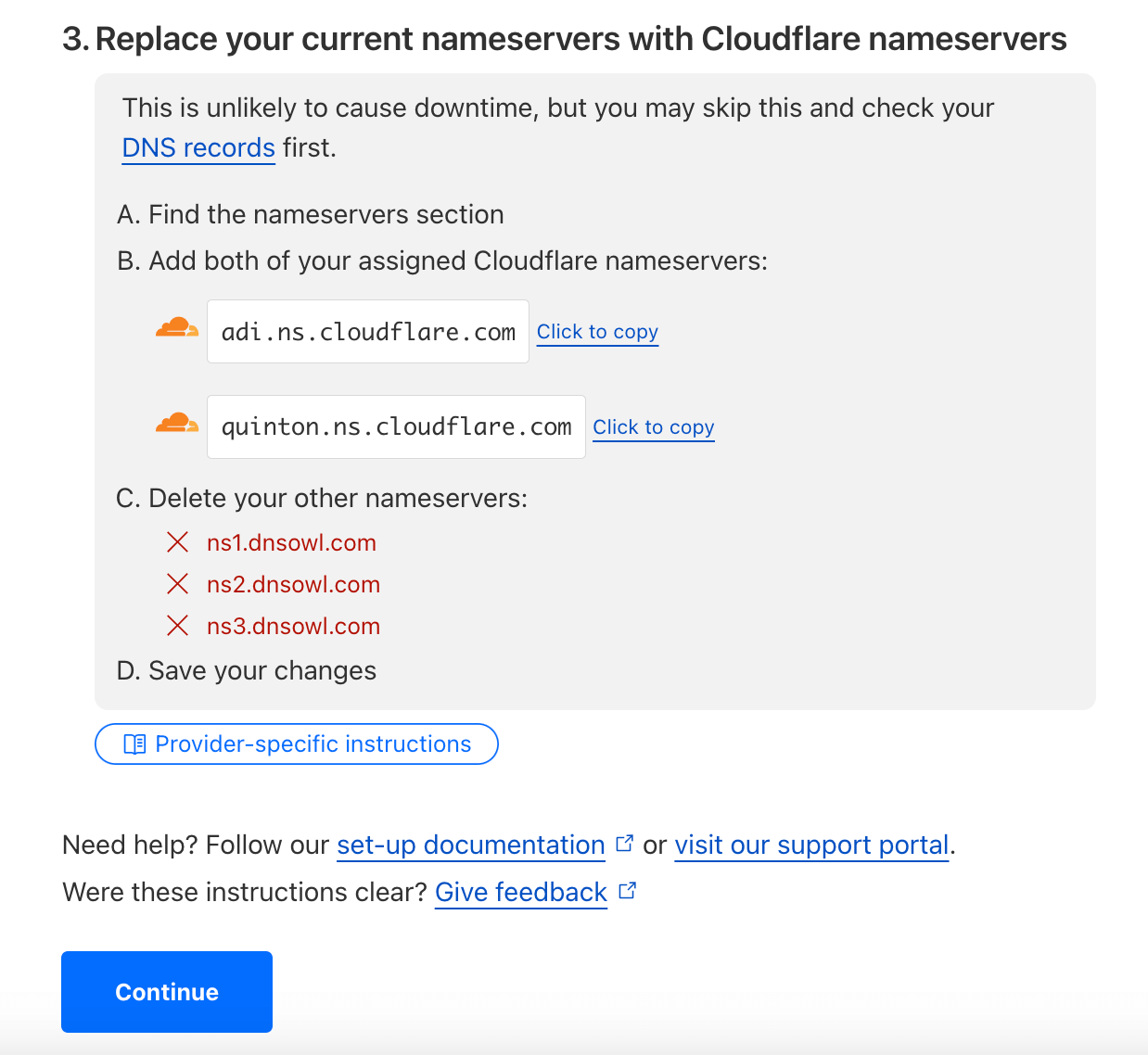
Cloudflare shows two nameservers. At your registrar, replace the existing nameservers with these two and save.
-
Wait until the domain shows Active in Cloudflare. This takes minutes, sometimes a few hours. Cloudflare emails you when it is done.
If you bought the domain from Cloudflare Registrar, its DNS is already on Cloudflare and you can skip this step.
3. Attach the domain to the site
Cloudflare Workers
Dashboard → Workers & Pages → <worker> (the front Worker, never <worker>-server) → Settings → Domains & Routes → Add → Custom domain → yourdomain.com. Repeat for www.yourdomain.com if you want it.
Cloudflare creates the DNS record and the certificate itself. If it refuses because a record for that hostname already exists, delete that record under the domain's DNS → Records and try again.
Then tell the agent the domain. It sets NEXT_PUBLIC_SITE_URL, registers the Stripe webhook for it, and deploys at once (the address is baked into the build). See Cloudflare Workers, step 8.
Vercel
Project → Settings → Domains → Add → yourdomain.com. Vercel shows the records to create: usually an A record for the bare domain and a CNAME for www. Add them exactly as shown at your DNS provider and wait until Vercel marks the domain as valid. Vercel can also redirect one of the two names to the other; choose that when it asks.
If the DNS is on Cloudflare, create the records with the proxy off (grey cloud, "DNS only") so Vercel can issue its certificate. If you turn the proxy on later, set SSL/TLS → Overview → encryption mode to Full (strict) in Cloudflare (check the dashboard, menus move).
Then tell the agent the domain. See Vercel, step 7.
After either one
The agent asks you to add the domain's callback URL at each login provider you use, for example in Google Cloud Console under the OAuth client's Authorized redirect URIs. See Login.
4. Records for email (Resend)
Resend sends your sign-in links and other mail from DEFAULT_ADMIN_EMAIL. It sends only from a domain whose ownership you prove with DNS records. The full setup is on Email; this is the DNS part.
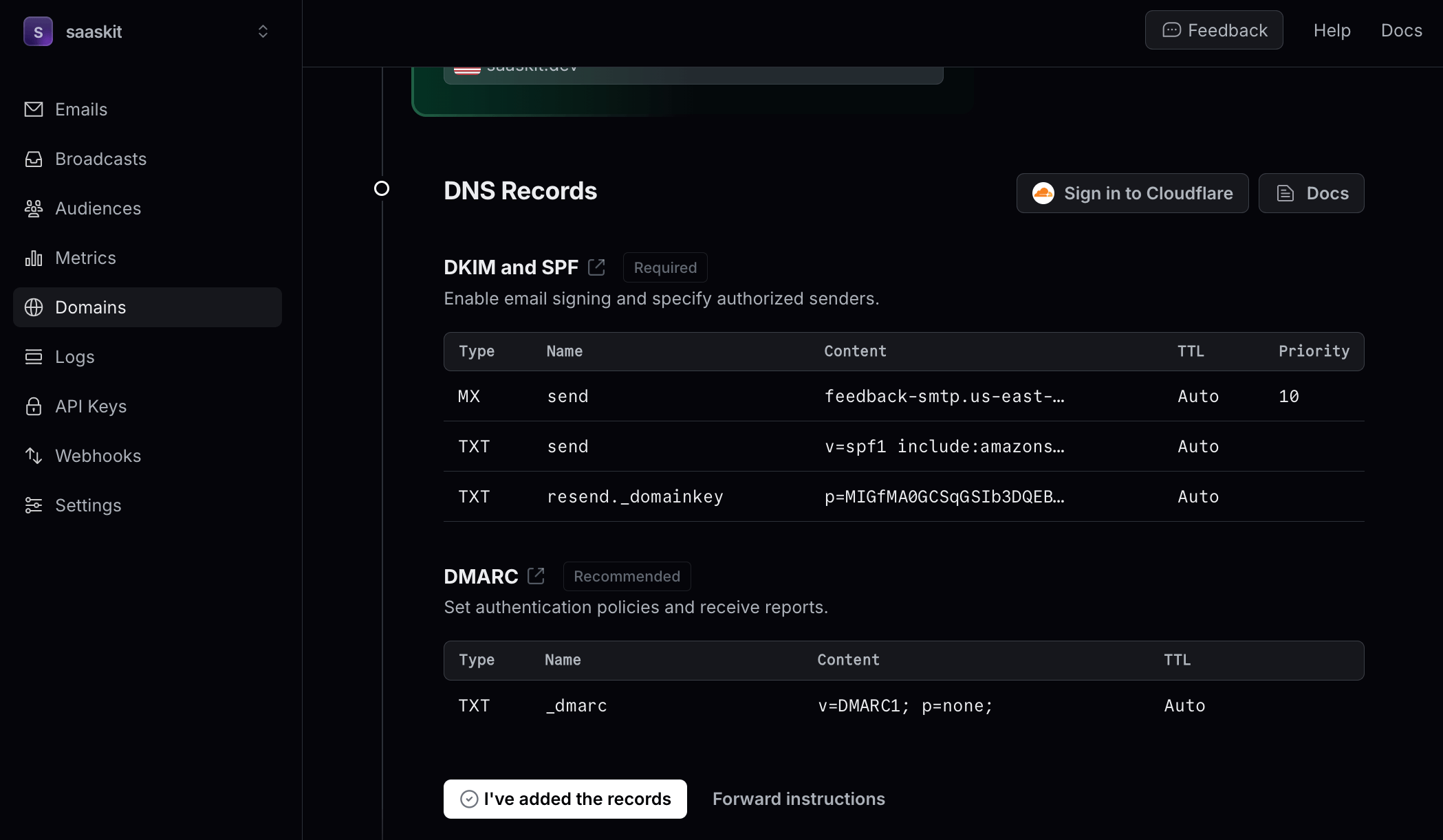
Agent: runs pnpm tsx scripts/check-email.ts --create-domain. It adds your domain to Resend and prints the records still missing, one per line, with type, name, value and, for MX, priority:
| Purpose | Type | Name (typical) | Value (typical) |
|---|---|---|---|
| SPF, bounce handling | MX | send |
feedback-smtp.<region>.amazonses.com, priority 10 |
| SPF | TXT | send |
v=spf1 include:amazonses.com ~all |
| DKIM | TXT | resend._domainkey |
p=MIGfMA0… (a long key) |
Copy the values the script prints, not the ones above: the region and the key are yours.
You: add each record at your DNS provider. On Cloudflare: your domain → DNS → Records → Add record, choose the type, paste the name and the value, save. Then tell the agent "done".
Things that go wrong here:
- The domain appears twice in the name. Some DNS panels add the domain to the name for you. Enter
send, notsend.yourdomain.com. After saving, check that the full name shows the domain once. - The records sit on a subdomain. The SPF records use the
sendsubdomain, so they do not clash with mail you receive on the bare domain (MX records foryourdomain.comitself).
Agent: reruns the check every few minutes until it prints ✓ domain … verified. It reads the status from Resend, so you do not need to look it up. Then it sends one test mail to an inbox you name.
DMARC (recommended): Resend's dashboard also suggests a TXT record named _dmarc with the value v=DMARC1; p=none;. It is not required for sending, and it helps mail land in the inbox.
5. Receiving mail on your domain (optional)
The app sends admin alerts to DEFAULT_ADMIN_EMAIL, so that address must reach someone. If you have no mailbox on the domain, Cloudflare Email Routing forwards it for free: your domain → Email → Email Routing → follow the guided setup, create hello@yourdomain.com → your personal inbox, and confirm the verification mail (check the dashboard, menus move). It adds its own MX and TXT records on the bare domain; they do not touch Resend's records on send.
When it fails
| What you see | Cause | Fix |
|---|---|---|
| The domain stays "Pending" in Cloudflare | the nameservers at the registrar are not yet the two Cloudflare names | You: check them at the registrar; wait up to a few hours |
| Cloudflare refuses the Worker custom domain | a DNS record for that hostname exists | You: delete it under DNS → Records, add the custom domain again |
| Vercel keeps the domain "Invalid Configuration" | records missing, wrong, or proxied | You: compare with what Vercel shows; set the Cloudflare proxy to DNS only |
| The site opens on Cloudflare-proxied Vercel only with SSL mode Full, not Full (strict) | the origin certificate is not valid yet | wait for Vercel's certificate, or use Full until it is issued |
domain … is pending / not_started in the email check |
records missing or not propagated | add the printed records; the agent rechecks in a few minutes |
domain … is failed |
a typo, or the domain appended twice to a name | You: compare each record with the printed line; the agent restarts the verification |
| The test mail lands in spam | SPF or DKIM incomplete | check all records again; add DMARC |
Sign-in works on workers.dev or vercel.app but not on the domain |
NEXT_PUBLIC_SITE_URL is still the old address, or the provider callback URL is missing |
the agent updates the variable and deploys; You: add the callback URL at the provider |