
Deploy to Vercel
What the agent does and what you do to put the site on Vercel, why vercel.json has to go first, and what to do when a deploy fails.
Outcome: the health check answers 200 with "status":"ok" and "database":{"status":"ok"…}, first on the *.vercel.app production address, then on your domain:
curl -sS -w '\nHTTP %{http_code}\n' https://<project>.vercel.app/api/health
curl -sS -w '\nHTTP %{http_code}\n' https://<your-domain>/api/health
The agent does not report the deploy as done until it does.
Time: about 15 minutes of agent time plus one Vercel build. You connect GitHub to Vercel once and add the domain's DNS records.
Tell the agent: "Deploy to Vercel." It follows skills/deploy-vercel/SKILL.md.
First: vercel.json turns off deploys from main
The repo ships with this vercel.json:
{ "git": { "deploymentEnabled": { "main": false } } }It exists because the default deploy target is Cloudflare. With it in place, a Vercel project imported from this repo never deploys a push to main. The agent deletes the file as its first step (or replaces its content with a crons block if you need the scheduled job, see below). If you deploy only to Vercel, it also turns off the Cloudflare workflow (gh workflow disable cloudflare.yml), which would otherwise try to build every day. gh workflow enable turns it back on.
The Cloudflare files (cloudflare/, wrangler*.jsonc, open-next.config.ts) stay in the repo and do nothing on Vercel.
What you do
You: a Vercel account. A site that takes payments needs the Pro plan; Hobby is for non-commercial use (check Vercel's pricing page).
You: let Vercel read the repository. vercel.com → Add New… → Project → Import Git Repository → Install or Adjust GitHub App permissions → allow the repo.
You: if the agent uses the Vercel CLI, confirm vercel login in the browser once.
You: a domain, and the DNS records Vercel shows for it (step 7 below). See Domain and DNS.
The agent asks for each of these when it reaches the step that needs it. It never prints a key back to you.
What the agent does
- Lets Vercel deploy
main. Agent: deletesvercel.json, commits, pushes. - Creates the project. Agent:
vercel linkandvercel git connect, or you import the repo in the dashboard (Add New… → Project → the repo → Import). Settings: Framework Preset Next.js, Root Directory./, Build Commandpnpm build(neverpnpm cf:build), Install Commandpnpm install. Node.js Version22.xunder Project → Settings → Build and Deployment. The agent addsENABLE_EXPERIMENTAL_COREPACK=1so Vercel installs the pnpm version the repo pins. - Adds the environment variables. Agent: creates
.env.production.local(never committed) from.env.localwith the production values:NEXT_PUBLIC_SITE_URL(thevercel.appaddress until the domain is attached),DATABASE_URL(the production database), a freshBETTER_AUTH_SECRETandCRON_SECRET. It adds every key to the Production environment withvercel env add, leaving out the Cloudflare-only keys (CF_ENV_KEY,CF_ENV_SALT,CLOUDFLARE_API_TOKEN,DEPLOYMENT_PLATFORM,WORKER_VERSION_ID,VERCEL_ENV). Then it runs the migrations on the production database. - Deploys and verifies. Agent: pushes to
main(orvercel deploy --prod), waits for the deployment to beReady, runs the health check. - Production Stripe webhook. Agent: registers the webhook for the production address, adds its secret to Vercel, redeploys, and fires one signed test event.
- Scheduled job (optional). Agent: adds
/api/cron/creditstovercel.jsononce your site sells subscriptions or uses PayPal:
The route is written to run every minute. If your plan does not allow per-minute crons, it can run less often (check Vercel's cron limits): due credit grants are also settled when a user's balance is read.{ "crons": [{ "path": "/api/cron/credits", "schedule": "* * * * *" }] } - Your domain. You: Project → Settings → Domains → Add → your domain. Vercel shows the records to create, usually an A record for the bare domain and a CNAME for
www. Add them at your DNS provider and wait until Vercel shows the domain as valid. Agent: setsNEXT_PUBLIC_SITE_URLto the domain, registers a Stripe webhook for it, asks you to add the domain's callback URLs at each login provider you use, redeploys, and runs the health check on the domain. - What is left. Agent: tells you what remains before launch: live Stripe keys, an env update and a redeploy.
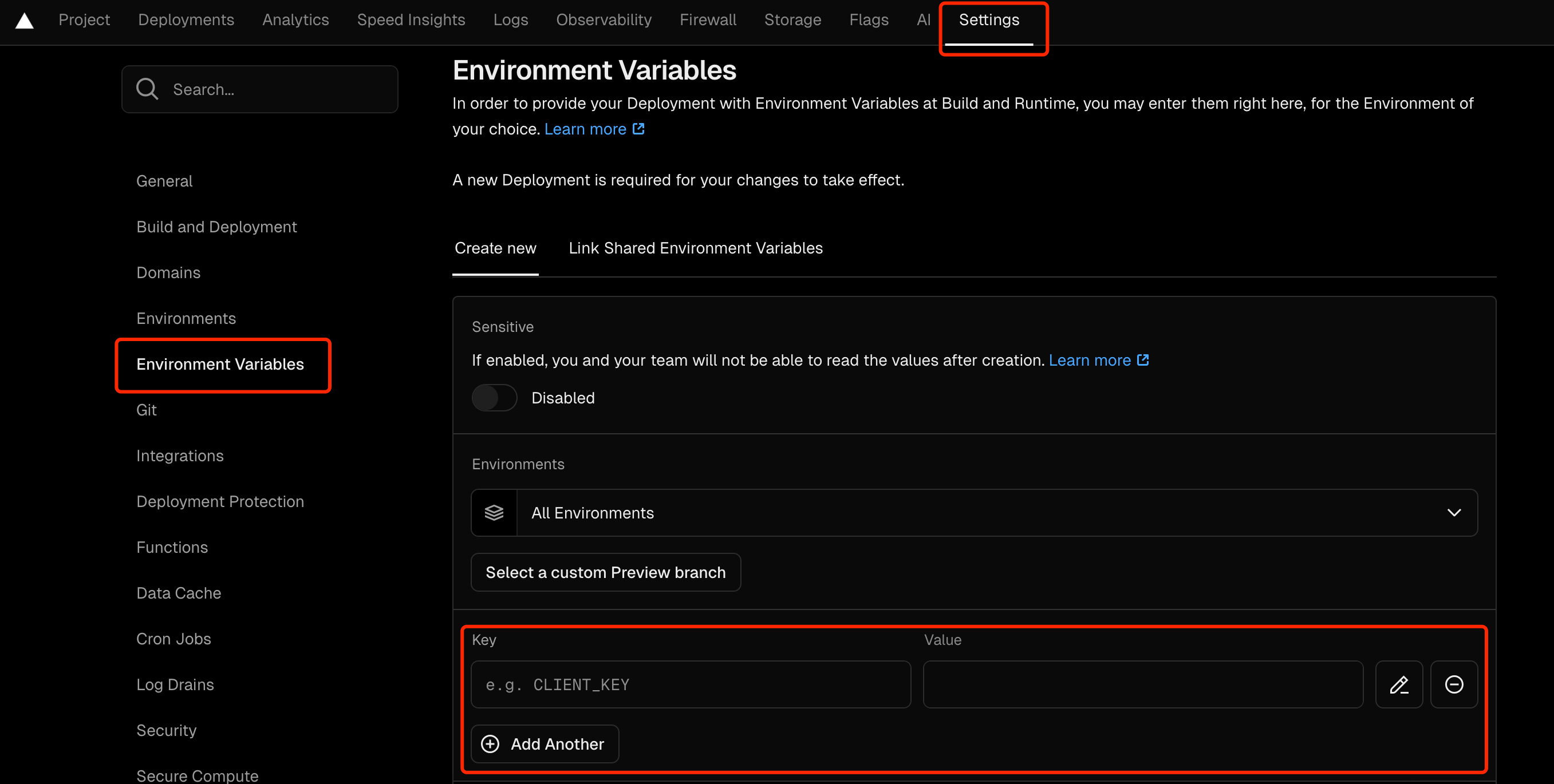
If you add variables in the dashboard instead: Project → Settings → Environment Variables. You can paste the whole .env file into the Key field and Vercel splits it (check the dashboard, menus move). Choose the Production environment.
Environment changes reach only new deployments. After changing a variable, redeploy: Deployments → the latest production deployment → … → Redeploy, or ask the agent to run vercel deploy --prod.
When a push goes live
After vercel.json is deleted, every push to main builds and deploys. Vercel offers version skew protection, which keeps a page left open across a deploy talking to the build it came from. It is a project setting that depends on your plan (check the dashboard, menus move).
Cloudflare or Vercel
The comparison table is on Cloudflare Workers. Two Vercel-specific points: image optimization (/_next/image) works and follows NEXT_PUBLIC_OPTIMIZED_IMAGES, and Vercel Analytics shows only on Vercel (the layout hides it when DEPLOYMENT_PLATFORM is set, so that variable must not be in the Vercel project).
When it fails
| What you see | Cause | Fix |
|---|---|---|
Pushes to main create no deployment |
vercel.json still disables main, or the repo is not connected |
the agent deletes the file or runs vercel git connect |
| Install fails with a pnpm or lockfile error | Vercel picked another pnpm version | the agent adds ENABLE_EXPERIMENTAL_COREPACK=1 |
Build fails reading the database, or DATABASE_URL is not set |
variables were added after the build started, or only to Preview | add them to Production and redeploy |
Health 200 but database: skipped |
DATABASE_URL missing in Production |
add it, redeploy |
Health 503, database: down |
wrong DATABASE_URL, or the database refuses Vercel's connections |
the agent checks the value from your machine and fixes it in Vercel |
| Sign-in fails on the production address | NEXT_PUBLIC_SITE_URL is another address |
the agent sets it to the address in use and redeploys |
Stripe test event answers 400 Webhook Error |
the webhook secret in Vercel belongs to another endpoint | the agent registers again and redeploys |
| The scheduled job runs but settles nothing | CRON_SECRET is not set in Vercel |
add it, redeploy |
curl gets a Vercel login page or 401 |
Deployment Protection is on for that URL | You: test on the production domain, or turn protection off for production under Project → Settings → Deployment Protection |
| The Cloudflare workflow still runs every day | it is independent of Vercel | the agent runs gh workflow disable cloudflare.yml |
| The domain stays invalid in Vercel | the DNS records are missing or wrong | You: compare each record with what Vercel shows; DNS can take minutes to hours |