
Auth
Turn on sign-in with Google, GitHub and email, and prove the running app accepts a real session.
Visitors can sign in and the app keeps them signed in when this check passes with the app running, followed by one real Google sign-in by you:
pnpm tsx scripts/check-auth.tsIts last line must be Auth: all checks passed. Database must pass first: users and sessions live there.
Sign-in methods
Sign-in runs on Better Auth, configured in lib/auth/index.ts.
| Method | Turned on by | Notes |
|---|---|---|
NEXT_PUBLIC_GOOGLE_CLIENT_ID + GOOGLE_CLIENT_SECRET |
also turns on Google One Tap, the sign-in prompt Google shows on the page | |
| GitHub | NEXT_PUBLIC_GITHUB_CLIENT_ID + GITHUB_CLIENT_SECRET |
optional |
| Magic link | Email set up | a sign-in link by mail, valid 5 minutes |
| Email code | Email set up | a 6-digit code by mail, valid 10 minutes |
There is no email and password sign-in. A Google or GitHub button only appears on the login form when that provider's client ID is set. A Google or GitHub account is linked to an existing user with the same email, so the owner can use either.
Turnstile (optional) is Cloudflare's bot check. With its two keys set, the login form shows the widget, and the server checks it on every request that sends a sign-in mail or signs in by email. Google and GitHub sign-ins are not gated by it.
You
| Value | Where you get it |
|---|---|
BETTER_AUTH_SECRET |
nothing to do: the agent generates it |
NEXT_PUBLIC_SITE_URL |
nothing to do locally (http://localhost:3000); for production, tell the agent your exact domain, www or not |
NEXT_PUBLIC_GOOGLE_CLIENT_ID, GOOGLE_CLIENT_SECRET |
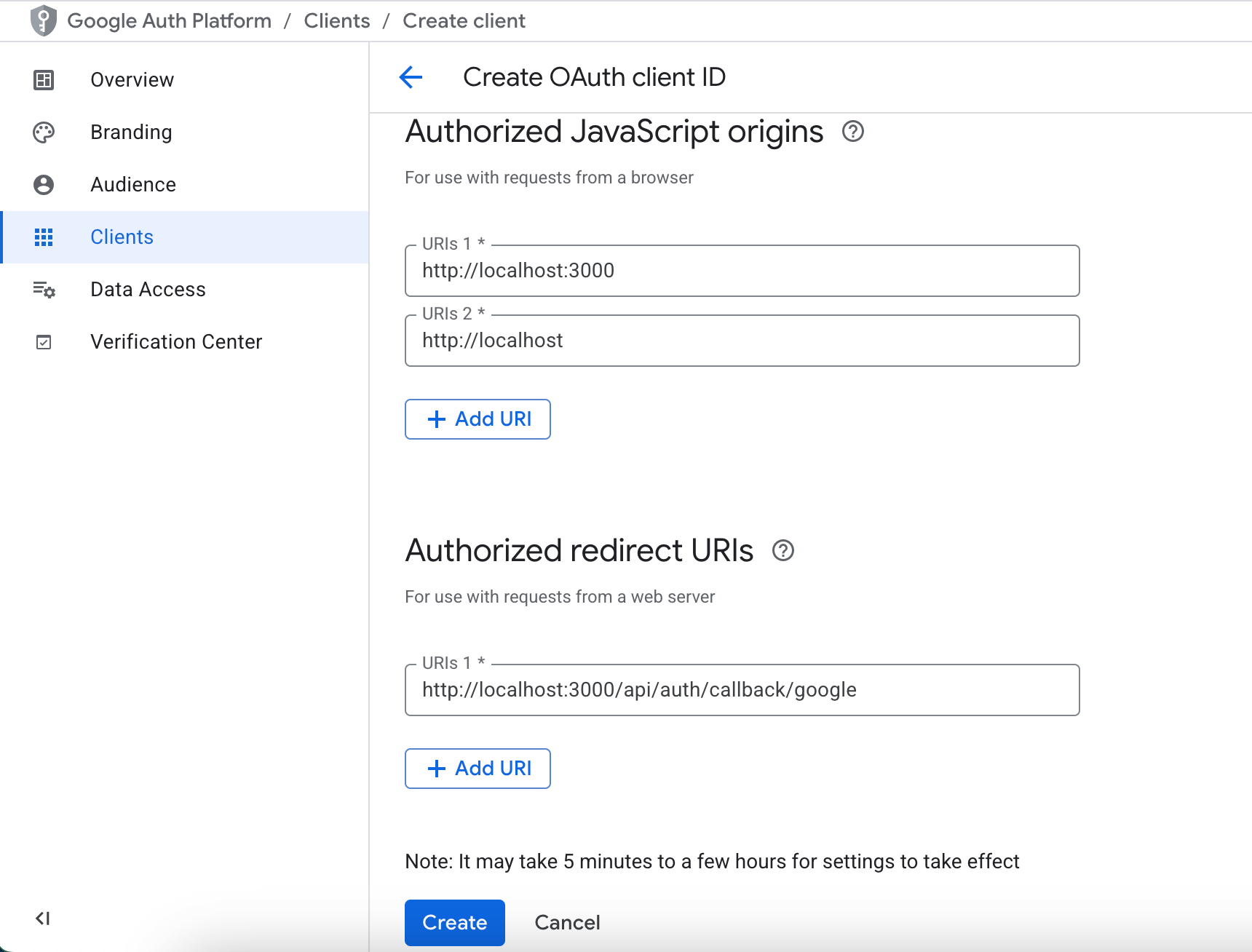
Google Cloud Console → pick or create a project → APIs & Services → OAuth consent screen (Google Auth Platform): app name, support email, audience External → Clients → Create client → type Web application → Authorized JavaScript origins: the site origin (http://localhost:3000 locally; One Tap needs it) → Authorized redirect URIs: the URI the agent prints, <site URL>/api/auth/callback/google → Create → copy Client ID and Client secret |
NEXT_PUBLIC_GITHUB_CLIENT_ID, GITHUB_CLIENT_SECRET (optional) |
github.com → Settings → Developer settings → OAuth Apps → New OAuth App → Homepage URL: the site; Authorization callback URL: <site URL>/api/auth/callback/github → Register application → copy Client ID → Generate a new client secret |
NEXT_PUBLIC_TURNSTILE_SITE_KEY, TURNSTILE_SECRET_KEY (optional) |
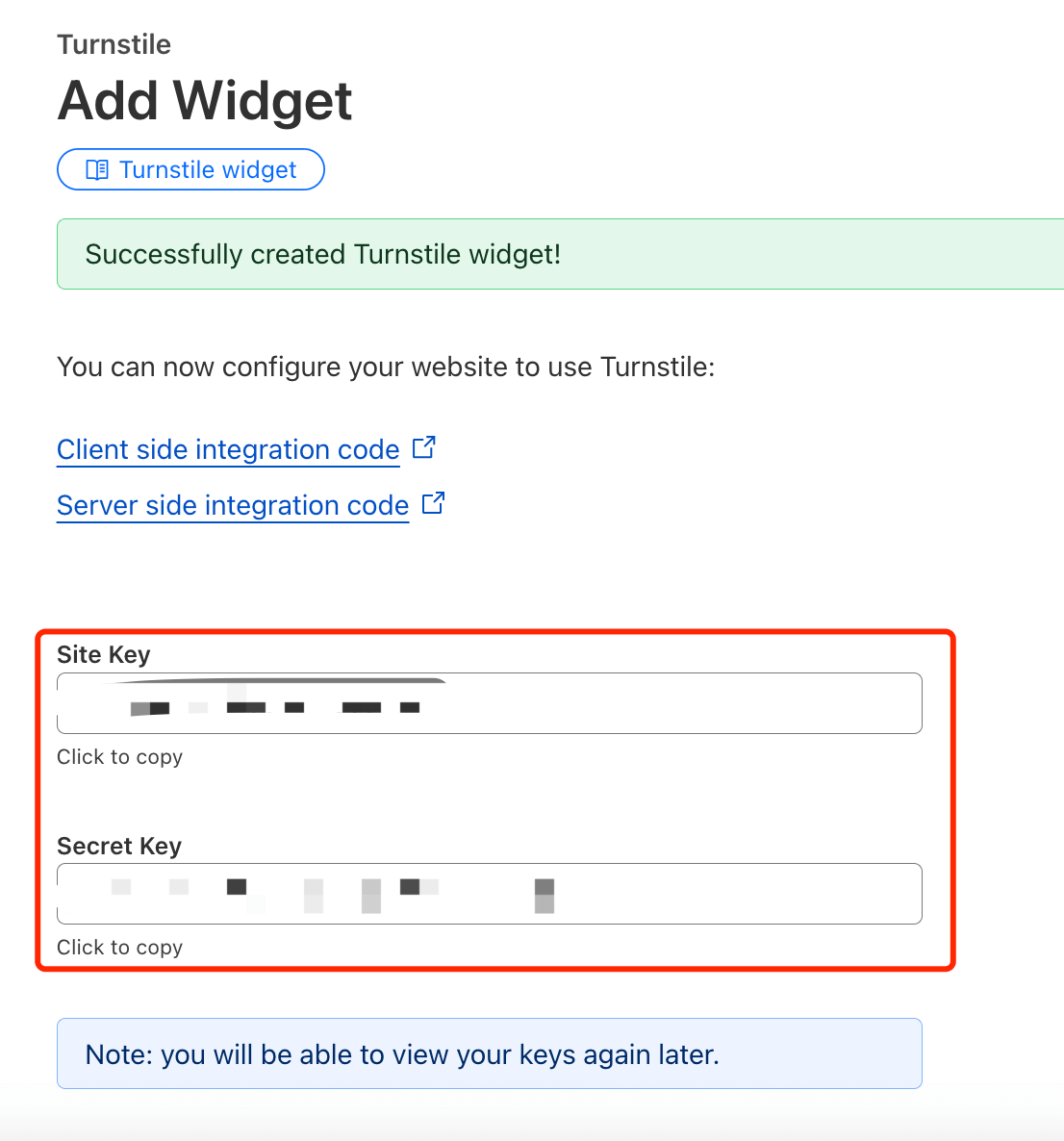
Cloudflare dashboard → Turnstile → Add widget → add your site's hostnames and localhost → copy Site Key and Secret Key |
The dashboard labels are as of late 2026 (check the dashboard, menus move). The redirect URI is the part that must match exactly: copy the one the agent prints.
In the Google client form, the origin and the redirect URI for local development look like this:
After Create, copy both values. Google shows the client secret only in this dialog:
For Turnstile, copy both keys after the widget is created:
Then You: sign in once for real (see below).
Agent
- Generates
BETTER_AUTH_SECRET(32 random bytes) and writes it into.env.local. It never changes it on a live site without asking you, because that signs everyone out. - Sets
NEXT_PUBLIC_SITE_URLto the bare origin the site runs on, with no trailing slash. - Prints the exact redirect URI and origin for your Google client, then writes the Client ID and secret you paste. Both or neither: one without the other fails the check.
- Adds GitHub and Turnstile the same way if you want them.
- Starts the app and runs the check. Beyond the env values, it confirms the auth API answers, that each provider redirects with the right client ID and redirect URI, and that a session signed with this secret in this database is accepted by the running app. The test user it writes for that is deleted again.
- Asks you to sign in with Google using the owner's email. You land signed in, and
/dashboardshows the admin menu.
What a pass looks like
✓ BETTER_AUTH_SECRET set (44 characters)
✓ NEXT_PUBLIC_SITE_URL = http://localhost:3000
✓ Google login configured (NEXT_PUBLIC_GOOGLE_CLIENT_ID, GOOGLE_CLIENT_SECRET)
  GitHub login off (NEXT_PUBLIC_GITHUB_CLIENT_ID / GITHUB_CLIENT_SECRET empty); …
✓ email login (magic link, OTP) can send through resend from DEFAULT_ADMIN_EMAIL
✓ GET http://localhost:3000/api/auth/ok → 200 {"ok":true}
✓ GET /api/auth/get-session without a cookie → 200 null
✓ Google: the app redirects to accounts.google.com with this client_id and redirect_uri http://localhost:3000/api/auth/callback/google
  the Google OAuth app must list exactly this redirect URI; only a real sign-in proves it (skills/setup-auth step 5)
✓ session round trip: a session signed with this BETTER_AUTH_SECRET in this database → get-session returns its user
  probe user deleted again (--keep leaves it)

Auth: all checks passed
The email login line reads off until Email is done. That is fine as long as Google is on. The check fails only when no sign-in method is configured at all.
The check cannot see the Google console. Only your real sign-in proves the redirect URI is registered there.
When it fails
| The check or the browser says | What it means | Fix |
|---|---|---|
BETTER_AUTH_SECRET has <n> characters |
the secret is shorter than 32 characters | the agent generates a new one |
NEXT_PUBLIC_SITE_URL=…: no trailing slash or origin only |
the URL ends in / or has a path |
the agent writes the bare origin |
only one of … is set |
one key of a pair is missing | paste the missing one, or clear both |
could not reach …/api/auth/ok |
the app is not running, or runs on another port | the agent starts the app or points the check at the right port |
GET …/api/auth/ok → 500 |
sign-in refused to start: secret missing or too short, or a bad base URL | the agent reads the app log, fixes the env and restarts |
the app sends client_id "…" |
the app started before the key was written | restart the app |
the app sends redirect_uri …, expected … |
the app runs with another site URL than the env file | make them equal and restart; in production, rebuild |
session round trip: get-session → 200 null |
the app uses another secret or another database than the env file | make both equal to the app's env and restart |
Google shows redirect_uri_mismatch |
the URI in the Google console differs (http vs https, www, port, trailing slash) |
copy the printed URI into the console exactly |
Google shows access blocked or "app not verified" |
the consent screen is in Testing and your account is not a test user | add your account as a test user, or publish the consent screen |
Going live
- The production env (
cloudflare/.env.production.localor the Vercel project) gets its own newBETTER_AUTH_SECRET,NEXT_PUBLIC_SITE_URL=https://<your domain>and the Google keys. - You: in the Google client, add
https://<your domain>to Authorized JavaScript origins andhttps://<your domain>/api/auth/callback/googleto Authorized redirect URIs. Do the same for the GitHub callback URL if you use GitHub. One client can hold the local and the production entries side by side. - You: publish the Google consent screen. While it is in Testing, only listed test users can sign in.
NEXT_PUBLIC_SITE_URLmust be the exact domain visitors open: in production it is the only origin sign-in trusts.- After deploying, the agent runs the check against the live domain, and you sign in with Google once on the live site.