
Stripe
Connect Stripe, create your products and prices from config/pricing.ts, and prove a payment becomes an order.
Customers can pay and every payment becomes an order in your database when this check passes:
pnpm tsx scripts/check-stripe.ts --fire <userId>Its last line must be Stripe: all checks passed. After that, you make one test payment by hand.
Your plans live in config/pricing.ts, the only place prices are defined. The agent creates the matching products and prices in Stripe from that file; you do not create them in the Stripe dashboard. The repository also contains Creem and PayPal adapters, but no setup skill covers them yet; this page is Stripe only.
You
| Value | Where you get it |
|---|---|
| What you sell | tell the agent: one-time license, subscription or credit pack, with price and currency |
STRIPE_SECRET_KEY |
Stripe Dashboard → Developers → API keys → Secret key. Use the sk_test_… key until the whole flow passes; switch to sk_live_… at launch |
STRIPE_WEBHOOK_SECRET (local only) |
nothing to copy: the agent gets it from the Stripe CLI. The first time, stripe login opens your browser once and you confirm |
| Payment methods | Stripe Dashboard → Settings → Payment methods. Card is on by default; Alipay, WeChat Pay and others are one click each. The API cannot change this, so only you can |
Only the secret key is needed. ShipAgent does not use a publishable key.
Payment methods, here with Alipay and WeChat Pay turned on:
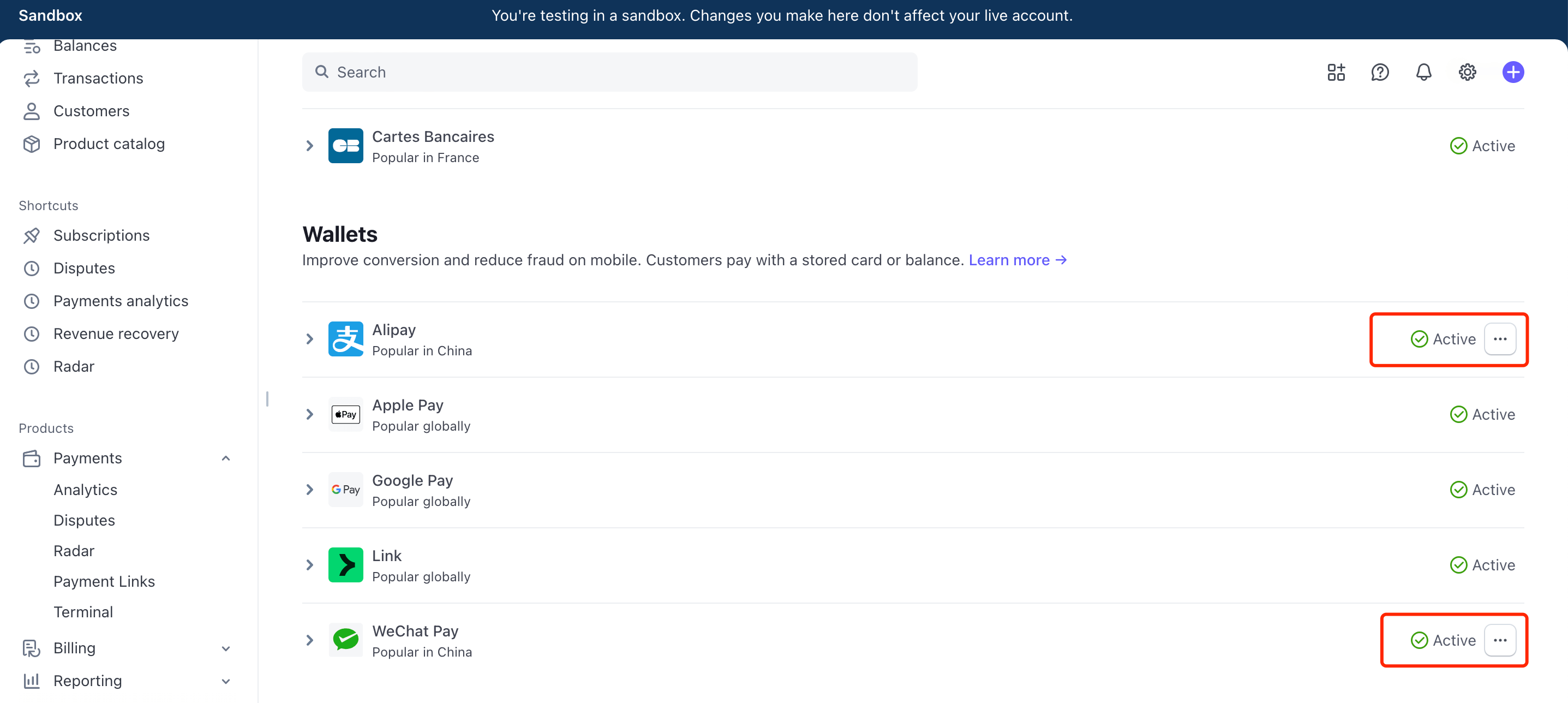
Stripe may ask for extra documents before it enables Alipay or WeChat Pay, and these methods may not cover subscriptions (check the dashboard, menus move).
Then You: sign in to your local site once (any method) so there is a user to test with, and make one test payment at the end.
Agent
- Writes the secret key into
.env.localand runs the check to confirm Stripe accepts it. - Edits the plans in
config/pricing.tsto what you sell, including the text for every language. - Runs
pnpm stripe:bootstrap --write: it creates the products and prices in Stripe and writes their ids into the file, in thetestcolumn with a test key and thelivecolumn with a live key. Rerunning reuses what exists. - Locally, keeps the Stripe CLI forwarding events to
localhost:3000/api/stripe/webhookand writes thewhsec_…secret it prints. - For production, registers the webhook endpoint with every event the app handles and saves its signing secret. Stripe shows that secret only once, at creation.
- Sends a signed test
checkout.session.completedfor your first one-time plan to the running app, checks that an order row with the right plan and amount appears, then deletes it. - Asks you to buy a plan through the pricing page with the test card
4242 4242 4242 4242, any future date, any CVC. The success page shows the plan,/dashboard/my-orderslists the order, and credits rise if the plan grants credits.
What a pass looks like
✓ STRIPE_SECRET_KEY valid (test mode, account acct_…)
✓ <plan id>: price_… = USD 49 one-time
✓ <plan id>: price_… = USD 19 / month
✓ STRIPE_WEBHOOK_SECRET is set
  NEXT_PUBLIC_SITE_URL is local (http://localhost:3000): Stripe cannot call it, endpoint check skipped
✓ signed checkout.session.completed accepted by http://localhost:3000/api/stripe/webhook
✓ order row written: <plan id>, 4900 cents, <n> credits

Stripe: all checks passed
There is one plan line for each active Stripe plan. Against a live domain, the endpoint line reads ✓ webhook endpoint https://<domain>/api/stripe/webhook enabled with all 8 events.
When it fails
| The check says | What it means | Fix |
|---|---|---|
STRIPE_SECRET_KEY rejected |
wrong key, or a restricted key that cannot read | paste the standard Secret key |
… price id is still a placeholder |
products and prices not created yet in this mode | the agent runs the bootstrap |
price … not found in test mode |
the id in the file belongs to the other mode | the agent runs the bootstrap with the matching key |
… amount ≠ … |
the price in Stripe no longer matches the file | fix the file, or create a new price; never edit a price that has been sold |
webhook endpoint … misses events |
the endpoint was made by hand | the agent deletes it and registers it again, or you add the events in the dashboard |
--fire → 400 Webhook Error |
STRIPE_WEBHOOK_SECRET is not the secret of the endpoint that is calling |
locally, the value the Stripe CLI printed; in production, the registered endpoint's secret |
--fire → 200 but no order row |
the app runs against another database than the check | point both at the same database |
--fire → 500 |
the user id does not exist | sign in once; the agent reads the real id |
Going live
- Switch
STRIPE_SECRET_KEYto yoursk_live_…key in the production env. - The agent runs
pnpm stripe:bootstrap --writeonce more with the live key. That fills thelivecolumn ofconfig/pricing.ts. - The agent registers the production webhook endpoint and puts its secret into the production env, then redeploys.
- The agent runs the check against the live URL, and you make one real payment.
- Turn on the payment methods you want in live mode too. Only you can do this.
- Never delete a plan that has been sold: retire it with
active: falseinconfig/pricing.ts.