
Analytics and other trackers
The optional trackers, ads, chat and affiliate scripts ShipAgent can load, and the variable each one needs.
Every tracker on this page is off until you set its variable, and each one turns itself off again when the variable is empty. There is no setup skill and no check script: you create the account, copy one or two values, and the agent puts them into the env files. All of them are NEXT_PUBLIC_* variables, which are read at build time, so a change needs a rebuild and redeploy.
The analytics, ads and affiliate scripts load only in production builds. They never load under pnpm dev, so test them on the deployed site. PostHog and Crisp are the exceptions noted below.
Google Analytics (GA4)
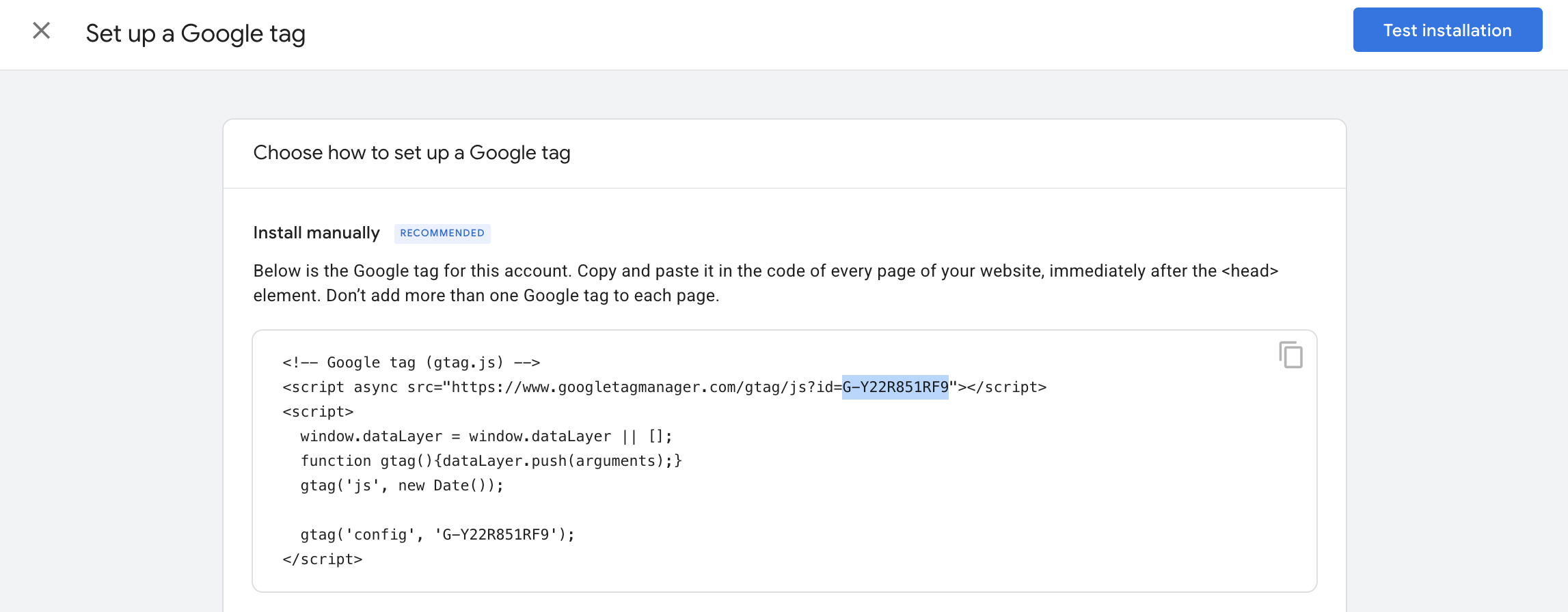
NEXT_PUBLIC_GOOGLE_ID=G-XXXXXXXXXXanalytics.google.com → Admin → Create property → add a Web data stream for your domain → copy the measurement ID that starts with G-.
Google AdSense
NEXT_PUBLIC_GOOGLE_ADSENSE_ID=1234567890123456adsense.google.com → add your site → in Verify site ownership, copy the number after ca-pub-. Paste the digits only: the app adds ca-pub- itself.
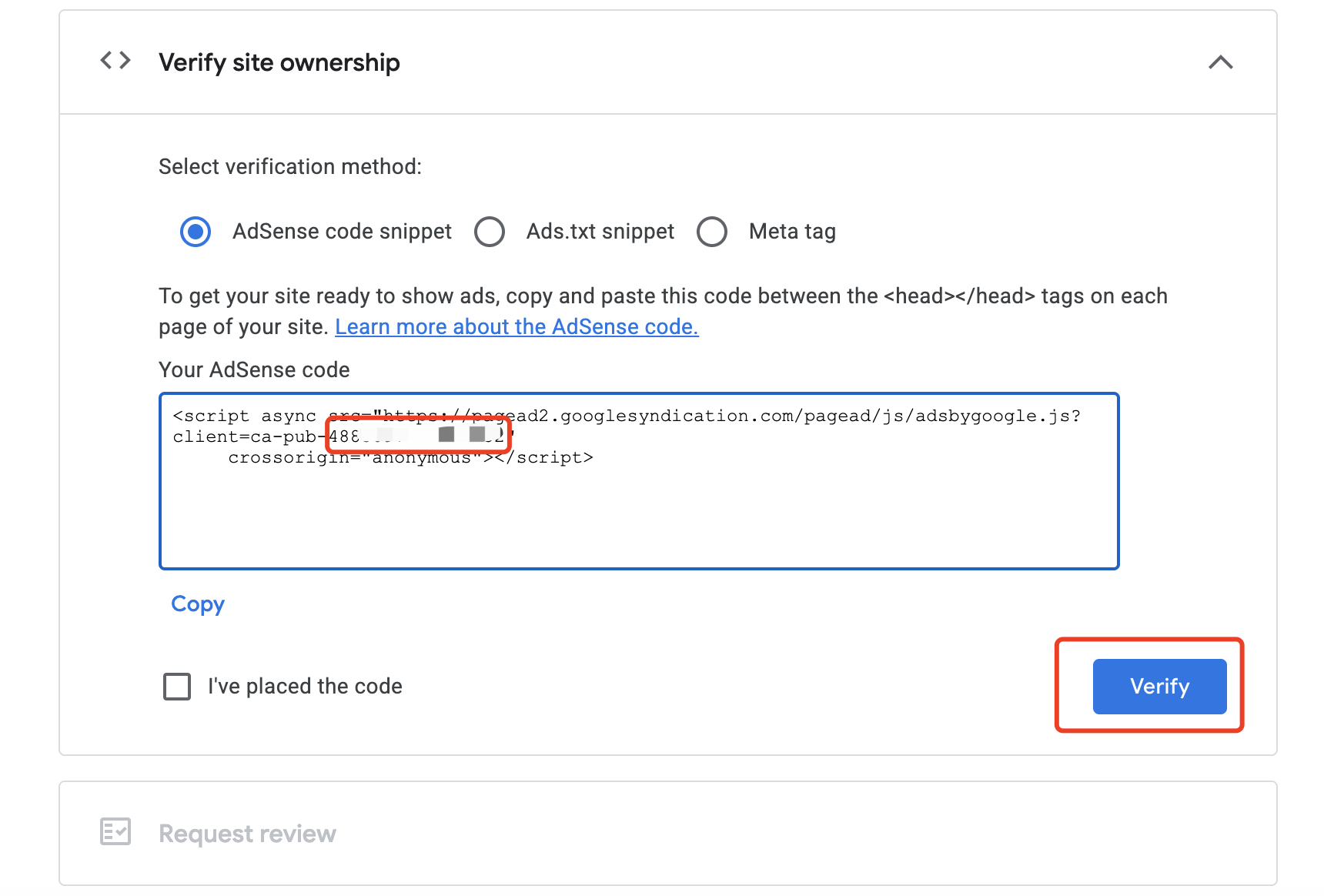
public/ads.txt ships with a placeholder line. Replace it with the line AdSense gives you. The app loads the AdSense script only; ads then appear through Auto ads in the AdSense dashboard. There is no ad slot component in the template. Your site needs to be live with real content before AdSense approves it.
Microsoft Clarity
NEXT_PUBLIC_CLARITY_PROJECT_ID=abcd1234efclarity.microsoft.com → create a project → Settings → Overview → copy the Project ID. Clarity records sessions and builds heatmaps.
Plausible
NEXT_PUBLIC_PLAUSIBLE_DOMAIN=yourdomain.com
NEXT_PUBLIC_PLAUSIBLE_SRC=https://plausible.io/js/script.js
plausible.io (or your own Plausible server) → Add a website → enter your domain without https://. NEXT_PUBLIC_PLAUSIBLE_DOMAIN is that domain. NEXT_PUBLIC_PLAUSIBLE_SRC is the script address from the install instructions Plausible shows next. Set both.
PLAUSIBLE_API_KEY and PLAUSIBLE_URL (your Plausible address) are optional. They are read by a server action in actions/plausible/index.ts that fetches visitor and pageview counts through Plausible's API. No page in the template uses it yet, so leave them empty unless you build one.
Umami
NEXT_PUBLIC_UMAMI_SRC=https://your-umami.example.com/script.js
NEXT_PUBLIC_UMAMI_WEBSITE_ID=xxxxxxxx-xxxx-xxxx-xxxx-xxxxxxxxxxxx
In Umami Cloud or your own Umami → Websites → add a website → copy the Website ID and the script address from its tracking code. Both are required.
Rybbit
NEXT_PUBLIC_RYBBIT_SRC=https://your-rybbit.example.com/api/script.js
NEXT_PUBLIC_RYBBIT_SITE_ID=1
NEXT_PUBLIC_RYBBIT_SESSION_REPLAY="true"
NEXT_PUBLIC_RYBBIT_REPLAY_MASK_SELECTORS='[".user-name", "#email"]'
In Rybbit, add your site and copy the src and data-site-id values from the snippet it shows. Both are required.
Session replay is optional: "true" turns it on (.env.example ships with it on). With replay on, list in the mask selectors the CSS selectors of every element that shows personal data, such as names and emails, so they are hidden in recordings.
PostHog
NEXT_PUBLIC_POSTHOG_KEY=phc_...
NEXT_PUBLIC_POSTHOG_HOST=https://us.i.posthog.com
posthog.com → create a project → Settings → Project → Web snippet: the key is the phc_… value, and the host is the api_host value (https://us.i.posthog.com or https://eu.i.posthog.com, depending on your region). Both are required.
PostHog records page views, page leaves and clicks automatically, and creates person profiles only for identified users. Unlike the others, PostHog starts as soon as both values are set, including under pnpm dev and before a visitor answers the cookie banner (see below).
Crisp chat
NEXT_PUBLIC_CRISP_WEBSITE_ID="xxxxxxxx-xxxx-xxxx-xxxx-xxxxxxxxxxxx"crisp.chat → create a website → Settings → Website Settings → Setup instructions → copy the Website ID (check the dashboard, menus move). A chat bubble appears at the bottom right of every page, also under pnpm dev. For signed-in visitors, the app passes their email, name and avatar to Crisp, so you see who you are talking to. Answer messages in the Crisp Inbox.
Tolt (affiliates)
NEXT_PUBLIC_TOLT_ID=xxxxxxxx-xxxx-xxxx-xxxx-xxxxxxxxxxxxapp.tolt.io → Settings → Integrations → Stripe → Connect your Stripe account → copy the data-tolt ID shown in the tracking script. Tolt runs your affiliate program: partners get links, and Tolt pays commission on the sales they bring.
The Tolt script loads in production only. When a visitor arrived through an affiliate link, the checkout passes the referral to Stripe in the session's metadata (tolt_referral), which is how Tolt matches the sale.
Google Search Console
There is no variable for Search Console. search.google.com/search-console → Add property → Domain → add the TXT record it gives you at your DNS provider. Then, under Sitemaps, submit https://yourdomain.com/sitemap.xml. The app serves the sitemap and robots.txt itself.
Vercel Web Analytics
On Vercel, the app also mounts Vercel's own analytics script. There is nothing to set in the app; turn Web Analytics on in the Vercel project (check the dashboard, menus move). It does not load on Cloudflare.
Cookie consent
NEXT_PUBLIC_COOKIE_CONSENT_ENABLED decides whether the site asks visitors before it tracks them. It is "false" in .env.example: no banner, and every tracker you configured loads right away. Set it to "true" to show a cookie banner, with cookie settings on the privacy policy page. Then Google Analytics, AdSense and Clarity load only after the visitor clicks accept. Plausible, Umami, Rybbit and Vercel Analytics load either way. PostHog is not held back by the banner: it starts as soon as its two values are set. The app's own first-party signup attribution stops only when a visitor declines.