
Send the site's mail through Resend from your own domain, verified with SPF and DKIM, and prove a real mail arrives.
The site can send sign-in links, codes and notices from your own domain when this check passes and the test mail is in your inbox:
pnpm tsx scripts/check-email.ts --to you@example.comIts last line must be Email: all checks passed. Email sign-in (magic link and code) works from then on.
You
| Value | Where you get it |
|---|---|
DEFAULT_ADMIN_EMAIL |
you choose it: an address on your own domain, such as hello@yourdomain.com. Not Gmail or Outlook: those domains cannot be verified |
DEFAULT_ADMIN_NAME (optional) |
the sender name shown in inboxes; empty means the site name from config/site.ts |
RESEND_API_KEY |
resend.com → sign up or log in → API Keys → Create API Key → Permission Full access → Add → copy the re_… key. It is shown once |
| DNS records | you add them at your DNS provider (Cloudflare, Namecheap …). The agent prints the exact type, name and value of each |
All mail is sent from DEFAULT_ADMIN_EMAIL, and admin alerts are sent to it. Use a mailbox someone reads, or one that forwards.
Use Full access while setting up: the check reads your domain's status, which a Sending access key cannot do.
The Resend click paths are as of late 2026 (check the dashboard, menus move).
When the agent prints the DNS records, add each one at your DNS provider exactly as shown, then tell the agent "done". Resend lists the same records on its Domains page:
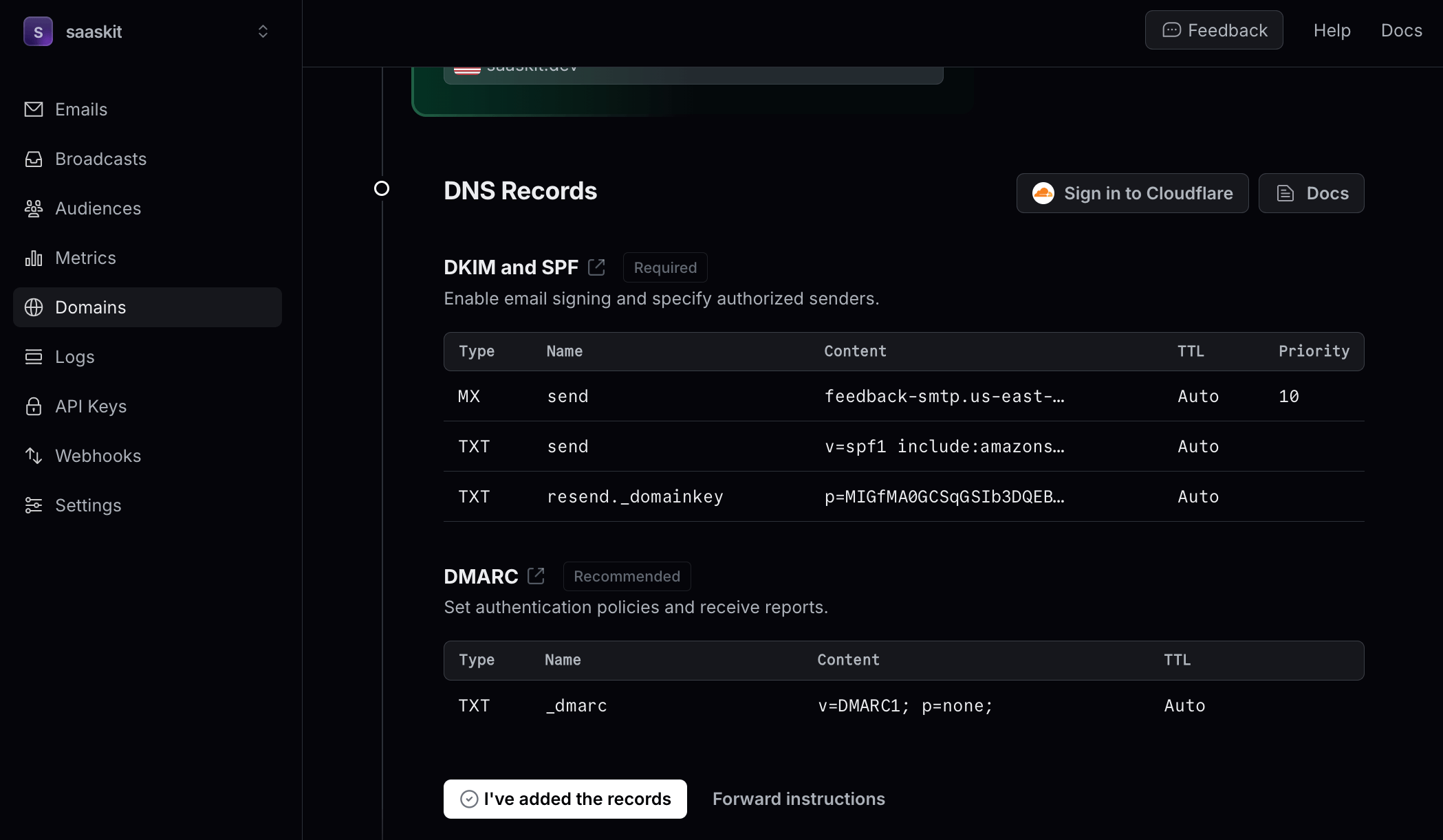
Copy each name exactly. If your DNS panel shows the full name after saving, check that your domain appears in it only once. DNS changes take minutes, sometimes hours. For a domain on Cloudflare DNS, see Domain.
Agent
- Writes the sender address and the Resend key into
.env.localand runs the check to confirm the key works. - Adds your sender's domain (the part after
@) to Resend and prints the SPF and DKIM records still missing. - After you say "done", reruns the check every few minutes until the domain reads verified. It reads the status from Resend, so it never has to ask you whether it worked.
- Sends one real sign-in mail to the inbox you name. It is rendered from the app's own template and sent through the app's own mail code.
- Asks you to confirm the mail arrived (check spam). In spam usually means a DNS record is missing.
- Then tries the real flow: sign in by email, and both the link and the 6-digit code must arrive.
What a pass looks like
✓ sender DEFAULT_ADMIN_EMAIL = hello@yourdomain.com
✓ RESEND_API_KEY valid (1 domain(s) in the account)
✓ domain yourdomain.com verified (region us-east-1)
✓ test mail sent to you@example.com through lib/mail (resend), message id <id>

Email: all checks passed
Before the records are in, the domain line reads ✗ domain yourdomain.com is pending (or not_started) and the check lists the records to add.
What the app sends
All mail goes out from DEFAULT_ADMIN_EMAIL. Without it, email sign-in and team invitations fail and the other mails are skipped.
| To | |
|---|---|
| Sign-in link (valid 5 minutes) | the user |
| Sign-in code (6 digits, valid 10 minutes) | the user |
| Welcome mail, which also adds the user to your contacts | each new user |
| Newsletter welcome | the subscriber |
| Team invitation | the invitee |
| Renewal payment failed | the user |
| Charge refunded after a fraud warning | the user |
| Credits failed to land after a payment | DEFAULT_ADMIN_EMAIL |
| Stripe fraud warning | DEFAULT_ADMIN_EMAIL |
The app sends no purchase receipt. A paid order is announced on Discord (when DISCORD_WEBHOOK_URL is set) and in the event monitor.
User feedback alerts are separate: they use their own ALERT_RESEND_KEY, ALERT_FROM and ALERT_TO, and stay off unless all three are set.
Alternative: Cloudflare Email Sending. Instead of Resend, the app can send through Cloudflare: DEFAULT_EMAIL_PROVIDER=cloudflare, CLOUDFLARE_EMAIL_API_TOKEN (a token with the permission Account → Email Sending → Send) and CLOUDFLARE_ACCOUNT_ID, with your domain set up for Email Sending in the Cloudflare dashboard. The check cannot read the domain status there, so a delivered test mail is the only proof.
When it fails
| The check says | What it means | Fix |
|---|---|---|
RESEND_API_KEY rejected by Resend |
wrong or deleted key | create a new key and paste it |
… (Sending access key …) and cannot show whether the sender's domain is verified |
the key can send but not read domains | use a Full access key during setup, or the agent proves it with a test mail |
the sender's domain … is not in the Resend account |
the domain was never added, or was added under another Resend team | the agent adds it |
domain … is pending or not_started |
DNS records missing or not propagated yet | add the printed records; the agent checks again in a few minutes |
domain … is failed |
a record is wrong: a typo, or the domain appended twice to the name | compare each printed record with your DNS panel; the next check restarts verification |
test mail not sent (resend): … naming the domain |
the sender is on another domain than the verified one | DEFAULT_ADMIN_EMAIL must be on exactly the verified domain |
| test mail sent but not in the inbox | spam folder, or SPF or DKIM missing | check spam; recheck the records |
| sign-in mail works in the check but not in the app | the app runs with other env values | restart the app; in production, sync the deployment env |
Going live
DEFAULT_ADMIN_EMAIL,DEFAULT_ADMIN_NAMEandRESEND_API_KEYgo into the production env, then the site is redeployed. For production you may use a second key with Sending access only.NEXT_PUBLIC_SITE_URLmust be your real domain: the welcome and newsletter mails build their unsubscribe link from it, and the invitation mail its accept link.- Resend has daily and monthly sending quotas. Check your plan before a launch with traffic.